
Your gaming setup is a reflection of your personality. You’ve invested in a high-refresh monitor, a mechanical keyboard with custom keycaps, maybe even an RGB headset stand. But there’s one element that often gets overlooked: what’s under your feet and chair. A gaming rug isn’t just about aesthetics, it’s about creating a dedicated zone that protects your floors, dampens sound, and ties your entire battlestation together. Whether you’re rocking a minimalist black-and-white theme or going full RGB chaos, the right gaming carpet can transform your space from a corner desk to a legitimate gaming den. In 2026, the market’s flooded with options ranging from anime-themed area rugs to LED-embedded floor mats, so knowing what to look for saves you from buyer’s remorse and wasted cash.
Key Takeaways
- A gaming rug protects your floors from chair casters, dampens sound, and creates a dedicated gaming zone that enhances both comfort and focus during long sessions.
- Gaming rugs come in multiple types—from themed designs and RGB-enabled options to minimalist patterns—allowing you to match your aesthetic while maintaining functionality.
- When choosing a gaming rug, prioritize durable materials like nylon, proper sizing based on your desk configuration (typically 4×6 to 8×10 feet), and anti-slip backing to prevent shifting.
- Mid-tier gaming rugs ($60–$150) offer the best value, balancing quality materials, licensed designs, and durability for most gamers without excessive cost.
- Regular maintenance like weekly vacuuming, immediate spot-cleaning of spills, and rotating your rug every few months extends its lifespan and keeps it looking fresh.
- A quality gaming rug is a cost-effective upgrade that ties your entire setup together—protecting floors and improving comfort for a fraction of what you spend on core components.
What Is a Gaming Rug and Why Does Your Setup Need One?
A gaming rug is essentially an area rug or floor mat designed to sit beneath or around a gaming desk and chair. Unlike generic home rugs, gaming rugs often feature designs inspired by gaming culture, pixel art, controller motifs, iconic game franchises, or minimalist patterns that complement modern setups. Some come with built-in LED strips or RGB lighting, while others prioritize functionality with anti-slip backing and extra cushioning.
The core purpose is threefold: protect your flooring from chair casters and foot traffic, define your gaming space visually, and improve comfort during marathon sessions. Hardwood and tile floors can take a beating from rolling office chairs, especially those heavy racing-style gaming chairs. A quality rug acts as a buffer, extending the life of your floors while giving your feet a softer surface than cold tile or concrete.
Beyond protection, a gaming rug creates a psychological boundary. When you step onto it, you’re entering your zone, the same way streamers set up backdrops or competitive players adjust their desks. It’s a subtle shift, but it matters when you’re trying to maintain focus during clutch rounds or long streaming sessions.
The Benefits of Adding a Gaming Rug to Your Gaming Space
Improved Comfort During Long Gaming Sessions
Sitting for hours, whether you’re grinding ranked, farming mats, or running a Twitch marathon, puts strain on your body. A cushioned gaming rug adds a layer of support beneath your feet, reducing fatigue compared to resting them directly on hard flooring. If you game barefoot or in socks (no judgment), the difference is immediate. Thicker rugs with memory foam or plush pile provide even more relief, making those 8-hour sessions slightly less punishing on your joints.
Enhanced Aesthetics and Room Atmosphere
Let’s be honest: a bare floor under your desk looks unfinished. A well-chosen gaming carpet pulls the room together, especially if you’ve color-matched your peripherals, LED strips, and wall art. Whether you go for a bold graphic rug featuring your favorite game or a clean geometric pattern, it anchors the space visually. For content creators, this matters double, viewers notice the details in your setup, and a cohesive environment reads as more professional.
Sound Dampening and Noise Reduction
Hard floors amplify every sound: chair rolls, footsteps, dropped controllers, even the hum of your PC fans. A thick rug absorbs a surprising amount of that noise, which is a blessing if you live in an apartment or share walls with roommates. Many gamers using budget-friendly recording setups have found that adding a rug reduces echo during streams or voice chat, improving audio quality without investing in foam panels.
Chair Protection and Floor Durability
Gaming chairs with hard plastic or rubberized wheels will eventually scratch or scuff hardwood, laminate, and even some vinyl floors. Over time, repeated rolling carves visible tracks into the finish. A durable gaming rug with high-density weave or protective backing prevents this damage, saving you from costly floor repairs or losing your security deposit. Some gamers double up with a chair mat on top of a rug for maximum protection, though a quality rug alone usually suffices for most setups.
Types of Gaming Rugs: Finding Your Perfect Match
Themed Gaming Rugs for Dedicated Fans
These are the crowd-pleasers: rugs featuring iconic franchises like The Legend of Zelda, Dark Souls, Overwatch, or retro classics like Street Fighter. Themed gaming rugs range from subtle nods, like a triforce pattern or pixel hearts, to full-blown character art and level maps. They’re perfect if you’ve already committed to a specific aesthetic (say, an all-Nintendo room or a cyberpunk build). Quality varies wildly, so check reviews for print clarity and colorfastness. Cheap sublimation prints fade after a few months of sunlight or vacuuming.
RGB and LED Gaming Rugs for Enhanced Ambiance
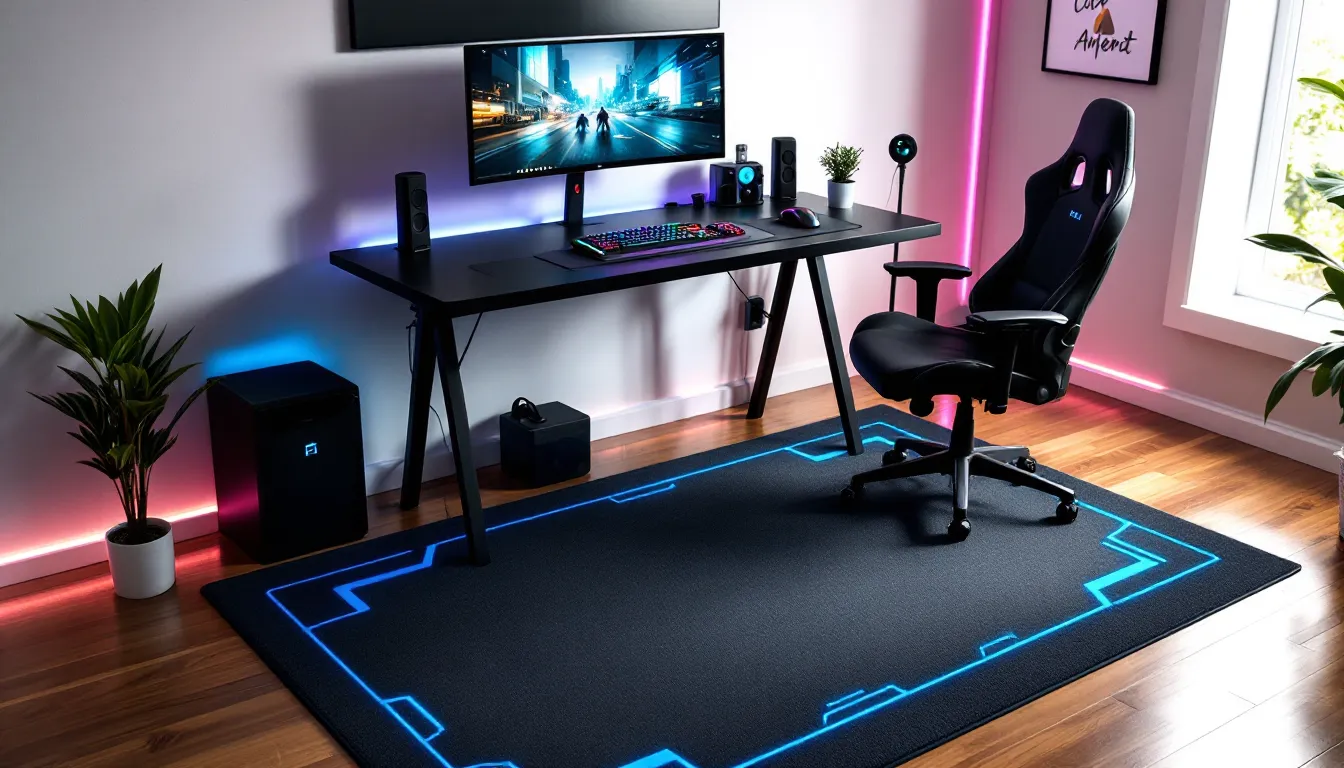
In 2026, RGB isn’t just for keyboards anymore. LED gaming rugs integrate addressable lighting strips around the perimeter or underneath, syncing with your other peripherals via software like Razer Chroma or Corsair iCUE. The effect is genuinely immersive when done right, reactive lighting that pulses with in-game actions or matches your stream alerts. Downsides include higher cost, reliance on power outlets, and the occasional sync issue. If your setup is already maxed on RGB, an LED rug is the cherry on top. If you prefer understated, skip it.
Minimalist and Modern Gaming Rugs
Not everyone wants Pikachu staring up from the floor. Minimalist gaming carpets use clean lines, monochrome palettes, or subtle geometric patterns that fit modern or Scandinavian-style rooms. Black-and-white hexagons, charcoal grays, or simple border designs work well if your setup prioritizes function over flash. These rugs age better visually, no risk of a design feeling dated when the next big game drops. They’re also easier to match with future upgrades or room changes.
Chair Mats vs. Area Rugs for Gaming
Technically, a chair mat is a hard plastic or polycarbonate sheet designed purely for floor protection and smooth rolling. An area rug is fabric-based, offering comfort and aesthetics but less mobility for your chair. Some gamers use both: a small chair mat over a larger rug for the best of both worlds. If you prioritize chair glide and have a heavy racing seat, a mat might be necessary. If comfort and looks matter more and you don’t move your chair much, a plush rug wins. Consider your chair type and how often you reposition during gameplay.
Key Features to Consider When Buying a Gaming Rug
Material and Durability
Most gaming rugs are made from nylon, polyester, or polypropylene. Nylon is the most durable and stain-resistant, holding up well under chair traffic and spills (looking at you, energy drink accidents). Polyester is softer and cheaper but wears faster. Polypropylene resists moisture and mildew, ideal for basement setups or humid climates. Avoid pure cotton unless it’s a low-traffic decorative piece, it pills, stains, and wears unevenly. Check the pile height (thickness of the fibers): low pile (under 0.5 inches) is easier to roll a chair over, while high pile (1+ inch) is plush but can snag wheels.
Size and Coverage Area
A rug that’s too small looks awkward and won’t protect your floor adequately. Too large, and it overwhelms the room or costs more than necessary. Standard sizes for gaming setups range from 4×6 feet (small desk, single chair) to 6×9 feet (L-shaped desk or dual monitor rig). If you have a racing sim rig with a pedal setup, you might need a full 8×10 feet to cover the footprint. Measure your space before shopping, more on that in the sizing section below.
Thickness and Cushioning
Thickness affects both comfort and chair mobility. Rugs under 0.5 inches thick allow smoother rolling but offer less cushioning. Rugs around 0.75 to 1 inch provide noticeable comfort underfoot and better sound dampening, but some chair wheels (especially smaller ones on budget chairs) may struggle or sink slightly. Memory foam or gel-infused rugs are the premium option for maximum comfort, though they’re overkill for most gamers unless you have specific joint or back issues.
Anti-Slip Backing and Safety
Nothing kills a clutch play faster than your rug sliding out from under your chair mid-movement. Look for rugs with rubberized or latex anti-slip backing. If your rug doesn’t have it, grab a separate anti-slip rug pad, they’re cheap and prevent bunching or shifting. This is especially critical on tile or laminate floors. Some rugs designed for high-traffic areas and gaming zones include reinforced edges to prevent curling, which is another common annoyance.
Top Gaming Rug Designs and Themes in 2026
The rug market in 2026 leans heavily into retro nostalgia and cyberpunk aesthetics. Pixel art designs inspired by 8-bit and 16-bit classics are everywhere, think Super Mario, Pac-Man, and Mega Man motifs. These appeal to older millennials and Gen Z gamers who grew up with these franchises or appreciate the retro wave.
Anime-themed rugs continue to dominate, especially designs featuring Demon Slayer, Chainsaw Man, and Jujutsu Kaisen. These range from subtle character silhouettes to full-color manga panel prints. Quality varies wildly, so verify the print resolution and licensing if authenticity matters to you.
Minimalist tech patterns, hexagons, circuit board designs, abstract glitch art, are gaining traction among PC enthusiasts who want a sleek, futuristic vibe without overt branding. Brands like Secretlab and Razer have released limited-edition rugs in 2026 that match their chair and peripheral lines, often selling out within weeks.
Custom and print-on-demand rugs are more accessible than ever. Sites let you upload your own artwork, clan logo, or Twitch branding to create a one-of-a-kind piece. Expect to pay a premium, but for streamers and esports teams, the branding value is worth it.
Finally, RGB-enabled rugs from companies like Corsair and Razer have improved in 2026 with better diffusion, brighter LEDs, and smoother software integration. They’re still niche and pricey, but early adopters report fewer bugs than the 2024-2025 models.
How to Choose the Right Size Gaming Rug for Your Setup
Measuring Your Gaming Space
Grab a tape measure and map out the floor area you want covered. Start from the back of your desk and extend forward to where your chair sits at its farthest roll distance, add at least 12 inches beyond that for buffer. Measure side-to-side, accounting for any side tables, speaker stands, or subwoofers. Sketch it out if needed. Don’t rely on eyeballing: a rug that’s 6 inches too short in any direction looks cheap and won’t protect the floor where it counts.
Sizing for Desk and Chair Configurations
For a standard single-monitor desk (48-60 inches wide), a 4×6 or 5×7 foot rug typically works. This covers the chair’s range and gives a clean border around the desk legs.
Dual-monitor or L-shaped desks benefit from 6×9 or 7×10 foot rugs. The extra width ensures you’re covered when swiveling between monitors or reaching for side peripherals.
Sim racing rigs or multi-station setups (like a desk plus a console gaming couch nearby) may need 8×10 feet or larger. If you’re using a racing wheel with pedals, measure the full extension of the pedal plate, some rigs need 5+ feet of depth.
When in doubt, go one size up. A rug that’s slightly too large can be adjusted with furniture placement: a too-small rug is an immediate visual fail and functional miss.
Maintenance and Cleaning Tips for Gaming Rugs
Gaming rugs take a beating: foot traffic, chair rolls, food crumbs, and the occasional spilled drink. Regular maintenance extends their lifespan and keeps them looking fresh.
Vacuum weekly with a standard upright or stick vacuum. Use a low or medium suction setting to avoid pulling fibers. For high-pile rugs, consider a vacuum with adjustable height. Avoid beater bars on delicate or printed rugs, they can fray edges or fade prints over time.
Spot-clean spills immediately. Blot (don’t rub) with a clean cloth and mild detergent mixed with water. For sticky messes like soda or energy drinks, a 50/50 mix of white vinegar and water works well. Test any cleaner on an inconspicuous corner first to avoid discoloration.
Deep-clean every 6-12 months depending on use. Rent a carpet cleaner or take the rug outside for a hose-down if it’s weather-resistant. Some synthetic rugs are machine-washable (check the tag), but most larger gaming rugs need professional cleaning or a DIY scrub with a brush and rug shampoo.
Rotate your rug every few months to distribute wear evenly, especially under the chair’s main path. This prevents visible traffic patterns and extends the rug’s life.
Protect from sunlight if your setup is near a window. UV rays fade prints and weaken fibers over time. Use blackout curtains or UV-blocking window film if your rug is expensive or custom-printed.
Where to Buy Gaming Rugs: Best Retailers and Options
Amazon remains the go-to for variety and price comparison. You’ll find hundreds of options, from budget $30 prints to premium $200+ custom rugs. Filter by customer reviews (4+ stars, 100+ reviews) to avoid low-quality dropship junk. Prime shipping is a plus if you need it fast.
Etsy is ideal for custom or handmade gaming carpets. Independent sellers offer unique designs, personalized clan logos, or niche fandom prints you won’t find elsewhere. Expect longer lead times (2-4 weeks) and higher prices, but the quality and originality can be worth it.
Wayfair and Overstock stock a range of modern and minimalist rugs that work well for understated gaming setups. Their frequent sales can knock 20-40% off premium rugs, especially during Black Friday or end-of-season clearances.
Gaming brands like Razer, Secretlab, and Corsair sell official rugs that match their peripheral ecosystems. These are pricier but offer guaranteed quality and aesthetic cohesion. Limited-edition drops sell out quickly, so follow their social channels for release alerts.
Reddit communities like r/battlestations and r/gamingsetups often have buying guides and discount codes shared by members. Reviewers on gaming culture platforms occasionally highlight emerging brands or Kickstarter projects offering innovative designs at competitive prices.
Local home goods stores (Target, IKEA, Home Depot) carry basic area rugs that can double as gaming rugs if you’re on a tight budget or prefer to see and touch before buying. They won’t have gaming-specific designs, but neutral patterns work fine for minimalist setups.
Budget Considerations: How Much Should You Spend?
Gaming rugs span a wide price range, and knowing where to invest, or save, depends on your priorities and setup.
Budget tier ($20-$60): Basic printed polyester rugs with simple designs. Expect thinner materials, less vibrant colors, and minimal cushioning. These work fine for temporary setups, dorm rooms, or casual gamers who don’t spend 6+ hours daily at their desk. Anti-slip backing may be basic or absent, requiring a separate rug pad. Durability is hit-or-miss: some last years, others fray within months.
Mid-tier ($60-$150): Better materials (nylon blends, higher-density weaves), licensed designs from popular franchises, and improved print quality. Rugs in this range typically include rubberized backing, moderate cushioning, and better stain resistance. This is the sweet spot for most gamers, solid performance without very costly. Expect 3-5 years of regular use with proper care.
Premium tier ($150-$300+): Custom designs, RGB/LED integration, memory foam cushioning, or high-end materials like wool blends. Official licensed rugs from Razer, Secretlab, or esports orgs fall here. You’re paying for aesthetics, brand, and durability. If your setup is a showpiece or you stream regularly, the investment makes sense. For average gamers, it’s overkill unless you have specific comfort or design needs.
Custom/print-on-demand ($100-$400+): Personalized rugs with your own artwork, team logo, or Twitch branding. Pricing depends on size, material, and complexity. Turnaround is 2-4 weeks. Worth it for professional streamers, esports teams, or anyone wanting a truly unique piece.
Don’t cheap out if you have hardwood floors or an expensive gaming chair, damage repair costs far exceed the price difference between a $40 and $100 rug. Conversely, if you rent and plan to move within a year or two, a budget option is perfectly fine.
Conclusion
A gaming rug isn’t a necessity, but it’s one of those upgrades that quietly improves your daily experience. It protects your floors, reduces noise, adds comfort, and visually ties your setup together, all for a fraction of what you spent on your GPU or monitor. Whether you go for a bold anime print, a sleek minimalist design, or an RGB-lit showpiece, the right gaming carpet transforms your space from functional to intentional.
In 2026, options are better than ever. Take the time to measure your space, match your aesthetic, and invest in quality materials that’ll last. Your floors, and your feet, will thank you.